OBS Studio Vulkan Layer: A Cross-Application DLL Loading Vulnerability.
Date: March 13, 2026 Author: xBrutalPandax Status: Unknown
Nothing groundbreaking, just a small security issue. OBS said “won’t fix,” so here we are.
¯\(ツ)/¯
TL;DR
OBS Studio's Vulkan implicit layer introduces a potential cross-application vulnerability because its obs-vulkan64.json manifest references graphics-hook64.dll in C:\ProgramData\obs-studio-hook, a directory where I found insecure permissions allowing local users to modify files. Using Process Monitor, I observed multiple applications loading the hook. For the PoC, I replaced the original DLL with a controlled library using the same filename and confirmed code execution in affected applications, as well as privilege escalation under my tested conditions. This demonstrates how compromising a shared Vulkan component can affect multiple applications without targeting each one individually. Status: Coordinated Disclosure (CVE Pending).
An attacker with the required local access could abuse the shared Vulkan hook to achieve cross-application DLL loading, code execution within affected application processes, persistence by triggering DLL loading when a process starts or an application launches at startup, and potentially privilege escalation under specific conditions
Table of Contents
- Executive Summary
- The Discovery
- Technical Analysis: DLL Hijacking
- Cross-Application Security Impact
- Proof of Concept and Validation
- Persistence and Privilege Boundaries
- Conclusion
Executive Summary
OBS Studio's Vulkan hook exposes a potential cross-application security vulnerability in which an improperly protected, globally registered Vulkan layer could allow a single compromised DLL to execute code in multiple applications that load it.
The Core Issue: A Shared Vulkan Hook
The vulnerability stems from OBS Studio's Vulkan hook being installed in C:\ProgramData\obs-studio-hook, where insecure permissions may allow any local user to modify its files.
The obs-vulkan64.json manifest registers graphics-hook64.dll as a Vulkan implicit layer, which other compatible applications may load during initialization. This means applications such as Steam, Discord, and Vulkan-based games could potentially load a modified DLL without being individually targeted.
A weakness in one shared graphics component could become a cross-application attack vector, potentially enabling code execution in multiple applications. If an affected application runs with elevated privileges, the impact could be more severe, although privilege escalation requires additional conditions to be demonstrated.
The Discovery
While playing a game, I started running Process Monitor and noticed something interesting. Multiple applications, including Steam and Discord, were accessing C:\ProgramData\obs-studio-hook and loading graphics-hook64.dll when launched.
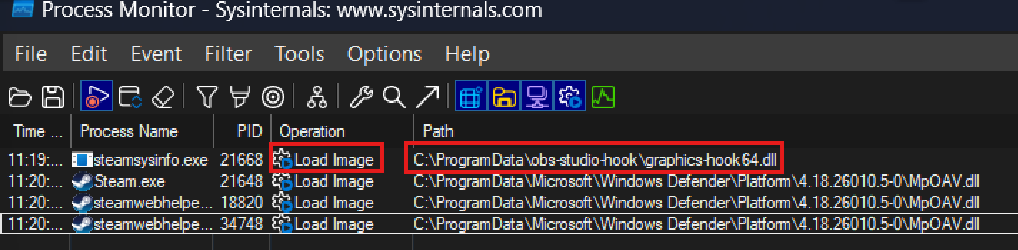
At first, I assumed this was part of how OBS integrates with games and other applications for graphics capture. Still, I wanted to investigate further and see if there was anything interesting behind this behavior.
That's when I realized these applications were loading a DLL installed by OBS Studio, even when I wasn't launching OBS directly. Curious about how this worked, I checked the directory's Access Control Lists (ACLs) and found that the BUILTIN\Users group appeared to have inherited Write and Append permissions.
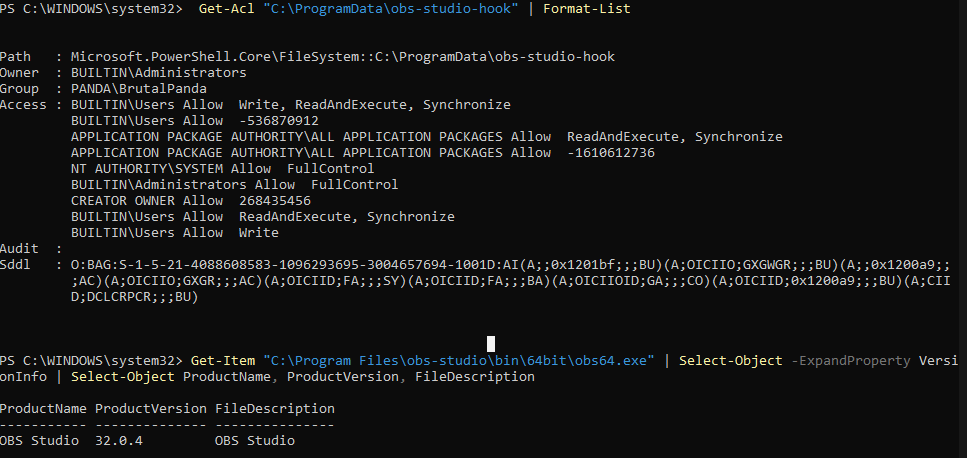 If standard user could modify a DLL that other applications load automatically, could this turn the graphics hook into a cross-application attack vector? (Yes it Can 😈)
Technical Analysis: DLL Hijacking
The relevant mechanism is Vulkan's implicit-layer loading system, rather than ordinary Windows DLL search-order hijacking alone.
A simplified loading chain is:
- OBS installs its graphics-hook DLL and Vulkan manifest.
- The manifest registers the hook as a Vulkan layer.
- The system's Vulkan loader discovers the registered implicit layer.
- A compatible application initializes Vulkan.
- The loader resolves the layer's library path and attempts to load the DLL.
- If the DLL has been replaced and the loader accepts it, the replacement code can execute inside the application's process.
The OBS manifest identifies the layer as VK_LAYER_OBS_HOOK and uses a relative library path:
.\graphics-hook64.dll
The manifest's location and the loader's resolution of that path are important to the analysis. An automatically discovered layer can reference a library whose integrity may not be adequately protected.
The directory is created by OBS Studio's Windows installer. The relevant part of install.bat, starting at line 20, is:
:setupProgramData
:: Required for UWP applications
mkdir "%PROGRAMDATA%\obs-studio-hook"
icacls "%PROGRAMDATA%\obs-studio-hook" /grant "ALL APPLICATION PACKAGES":(OI)(CI)(GR,GE)
The script creates the folder with mkdir and grants ALL APPLICATION PACKAGES read and execute access. It does not set or remove permissions for BUILTIN\Users, so whatever Users can do in that folder is inherited from its parent rather than configured by the installer.
This differs from classic DLL search-order hijacking. The relevant question is not simply whether an application searches an unsafe directory for a DLL. It is whether the Vulkan loader discovers a registered layer and loads the library specified by its manifest.
Cross-Application Security Impact
The broader concern is the potential for a vulnerability in one application's graphics integration to affect other software using the same graphics-loading infrastructure.
Vulkan is used by games, graphics applications, emulators, rendering tools, and other software. Some applications may initialize Vulkan indirectly through graphics frameworks or embedded components.
If an application loads the affected implicit layer, it may load the OBS hook even when the user did not explicitly launch OBS Studio.
This creates a possible trust-boundary problem: a DLL installed by one application may be loaded into the address space of another application because of a shared graphics integration mechanism.
A potential consequence includes:
- Cross-application code execution
- Persistence opportunities
- Broader exposure
- Unexpected application dependencies
Proof of Concept and Validation
- Verify the Installation Permissions
Inspect the permissions on the OBS hook directory:
icacls "C:\ProgramData\obs-studio-hook"Confirm whether the BUILTIN\Users group can modify the directory and its contents. - Verify Vulkan Layer Registration Inspect the Vulkan implicit-layer registry entries and the obs-vulkan64.json manifest. Confirm that the manifest references graphics-hook64.dll in the OBS hook directory.
- Validate Cross-Application Code Execution
Replace the original graphics-hook64.dll with a controlled proof-of-concept DLL using the same filename. Launch an application that loads the registered Vulkan layer and use Process Monitor or Process Explorer to verify that the replacement DLL is loaded into the target process.
During testing, I observed the hook being loaded by Chrome (
chrome://gputo verify), Discord, Steam, and Obsidian, demonstrating that the loading behavior was not limited to OBS Studio itself.
- Validate Privilege Escalation Separately verify the security context of the process/user loading the replacement DLL.
Results
The tests demonstrated cross-application code execution and privilege escalation under the tested conditions. The impact depends on the affected application's security context and the permissions available to modify the registered hook.
Persistence and Privilege Boundaries
The shared Vulkan-layer registration may create a repeatable execution path if the layer remains enabled and its DLL remains available.
For example, a compatible application that is launched repeatedly may load the registered layer on each launch. If the application runs on startup, the layer is loaded along with it. This can resemble persistence because execution is triggered by normal application activity rather than by an obvious new scheduled task or startup entry.
Privilege escalation is a separate question.
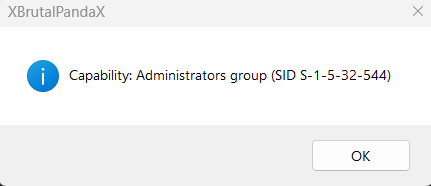
Code loaded into a process normally executes within that process's security context. If the host process runs as a standard user, loading a modified DLL does not inherently grant administrator privileges. If an elevated process loads the DLL, the consequences may be more serious, provided the attacker can influence the load and the elevated process actually accepts the modified library.
Maintainer Response
After reporting the issue, the OBS Studio project team replied:
We have looked, but we're reasonably sure that this workaround is required for our Vulkan capture hook to function properly with portable installs of OBS.
This is a long-standing issue when it comes to portable instances of OBS, where this hook needs to be installed in a very specific way, or it won't work properly.
FYI, it has been about 8 months. I know this isn't a big security issue, but still... 🙃
Conclusion
OBS Studio's Vulkan hook provides a concrete example of how a graphics integration can cross application boundaries through implicit-layer loading. If the associated DLL is modifiable by an unprivileged user, and other applications load that DLL automatically, the resulting exposure may extend beyond OBS Studio.
I think researching Vulkan apps more makes sense, as its layered architecture, cross-process component interaction, and rapidly growing adoption make it a fascinating—and under-researched—attack surface IMO. References
- OBS Studio Vulkan hook manifest
- OBS Studio Windows installation script
- Khronos Vulkan Loader and Layer Interface
Submitted this over 7 months ago and it wasn't fixed, so I might as well release it into the wild ¯_(ツ)_/¯. For further technical details, please refer to the official GitHub repository or the Khronos Vulkan Layer documentation.